---
title: Realizar Check-Out
description: ¿Cómo registrar el check-out en una reserva?
---
[Ir directamente al contenido](https://biblioteca.paxer.com/migration/es/realizar-check-out#main-content)
Español
Traducciones de Mostrar submenú de
[Contáctanos](https://biblioteca.paxer.com/migration/es/kb-tickets/new?hsLang=es) [Portal del cliente](https://biblioteca.paxer.com/tickets-view?hsLang=es) [Iniciar sesión](https://biblioteca.paxer.com/_hcms/mem/login?redirect_url=https%3A%2F%2Fbiblioteca.paxer.com%2Fmigration%2Fes%2Frealizar-check-out&hsLang=es)
![logo_border_white-1024-3.png\]](https://biblioteca.paxer.com/hs-fs/hubfs/logo_border_white-1024-3.png?height=40&name=logo_border_white-1024-3.png)
- [Default HubSpot Blog](https://paxer.hubspotpagebuilder.com/blog)
Abrir navegación principal
Cerrar navegación principal
- [Default HubSpot Blog](https://paxer.hubspotpagebuilder.com/blog)
- Español
Traducciones de Mostrar submenú de
- [Contáctanos](https://biblioteca.paxer.com/migration/es/kb-tickets/new)
- [Portal del cliente](https://biblioteca.paxer.com/tickets-view)
- [Iniciar sesión](https://biblioteca.paxer.com/_hcms/mem/login?redirect_url=https%3A%2F%2Fbiblioteca.paxer.com%2Fmigration%2Fes%2Frealizar-check-out)
- Ponte en contacto
Ponte en contacto
Bienvenido al Centro de conocimientos de Paxer, ¿Qué quieres saber el día de hoy?
- No hay sugerencias porque el campo de búsqueda está vacío.
1. [Centro de conocimientos](https://biblioteca.paxer.com/migration/es?hsLang=es)
2. [Reservas](https://biblioteca.paxer.com/migration/es/reservas?hsLang=es)
3. [Gestión de huéspedes](https://biblioteca.paxer.com/migration/es/reservas?hsLang=es#gesti%C3%B3n-de-hu%C3%A9spedes)
- [Reservas](https://biblioteca.paxer.com/migration/es/reservas?hsLang=es#main-content)
- [Crear y gestionar reservas](https://biblioteca.paxer.com/migration/es/reservas?hsLang=es#crear-y-gestionar-reservas)
- [Visualización de Reservas](https://biblioteca.paxer.com/migration/es/reservas?hsLang=es#visualizaci%C3%B3n-de-reservas)
- [Modificar y cancelar reservas](https://biblioteca.paxer.com/migration/es/reservas?hsLang=es#modificar-y-cancelar-reservas)
- [Gestionar cobros de reservas](https://biblioteca.paxer.com/migration/es/reservas?hsLang=es#gestionar-cobros-de-reservas)
- [Gestión de huéspedes](https://biblioteca.paxer.com/migration/es/reservas?hsLang=es#gesti%C3%B3n-de-hu%C3%A9spedes)
- [Facturación electrónica](https://biblioteca.paxer.com/migration/es/reservas?hsLang=es#facturaci%C3%B3n-electr%C3%B3nica)
- [E-commerce](https://biblioteca.paxer.com/migration/es/e-commerce?hsLang=es#main-content)
- [Datos de Contacto y Descripción del Hotel](https://biblioteca.paxer.com/migration/es/e-commerce?hsLang=es#datos-de-contacto-y-descripci%C3%B3n-del-hotel)
- [Redes Sociales y Experiencias](https://biblioteca.paxer.com/migration/es/e-commerce?hsLang=es#redes-sociales-y-experiencias)
- [Mi Negocio](https://biblioteca.paxer.com/migration/es/mi-negocio?hsLang=es#main-content)
- [Reporte de Reservas](https://biblioteca.paxer.com/migration/es/mi-negocio?hsLang=es#reporte-de-reservas)
- [Análisis de ocupación](https://biblioteca.paxer.com/migration/es/mi-negocio?hsLang=es#an%C3%A1lisis-de-ocupaci%C3%B3n)
- [Ingresos y Extras](https://biblioteca.paxer.com/migration/es/mi-negocio?hsLang=es#ingresos-y-extras)
- [Reportes de Clientes](https://biblioteca.paxer.com/migration/es/mi-negocio?hsLang=es#reportes-de-clientes)
- [Producto](https://biblioteca.paxer.com/migration/es/producto?hsLang=es#main-content)
- [Tipos de habitaciones](https://biblioteca.paxer.com/migration/es/producto?hsLang=es#tipos-de-habitaciones)
- [Planes de tarifas](https://biblioteca.paxer.com/migration/es/producto?hsLang=es#planes-de-tarifas)
- [Configuración de precios](https://biblioteca.paxer.com/migration/es/producto?hsLang=es#configuraci%C3%B3n-de-precios)
- [Gestión de inventario de habitaciones](https://biblioteca.paxer.com/migration/es/producto?hsLang=es#gesti%C3%B3n-de-inventario-de-habitaciones)
- [Mi Cuenta](https://biblioteca.paxer.com/migration/es/producto?hsLang=es#mi-cuenta)
- [Pasarelas de pago](https://biblioteca.paxer.com/migration/es/pasarelas-de-pago?hsLang=es#main-content)
- [Configuración de Stripe](https://biblioteca.paxer.com/migration/es/pasarelas-de-pago?hsLang=es#configuraci%C3%B3n-de-stripe)
- [Configuración de PCI Booking](https://biblioteca.paxer.com/migration/es/pasarelas-de-pago?hsLang=es#configuraci%C3%B3n-de-pci-booking)
- [Configuración de Webpay (Chile)](https://biblioteca.paxer.com/migration/es/pasarelas-de-pago?hsLang=es#configuraci%C3%B3n-de-webpay-chile)
- [Configuración de Mercado Pago](https://biblioteca.paxer.com/migration/es/pasarelas-de-pago?hsLang=es#configuraci%C3%B3n-de-mercado-pago)
- [Solución de Problemas de Pagos](https://biblioteca.paxer.com/migration/es/pasarelas-de-pago?hsLang=es#soluci%C3%B3n-de-problemas-de-pagos)
- [Configuración](https://biblioteca.paxer.com/migration/es/configuraci%C3%B3n?hsLang=es#main-content)
- [Configuración de Monedas e Impuestos](https://biblioteca.paxer.com/migration/es/configuraci%C3%B3n?hsLang=es#configuraci%C3%B3n-de-monedas-e-impuestos)
- [Gestión de Extras](https://biblioteca.paxer.com/migration/es/configuraci%C3%B3n?hsLang=es#gesti%C3%B3n-de-extras)
- [Configuración de Usuarios y Roles](https://biblioteca.paxer.com/migration/es/configuraci%C3%B3n?hsLang=es#configuraci%C3%B3n-de-usuarios-y-roles)
- [Caja Chica](https://biblioteca.paxer.com/migration/es/caja-chica?hsLang=es)
- [Onboarding y soporte](https://biblioteca.paxer.com/migration/es/onboarding-y-soporte?hsLang=es#main-content)
- [Artículos esenciales/claves o fuentes sugeridas](https://biblioteca.paxer.com/migration/es/onboarding-y-soporte?hsLang=es#art%C3%ADculos-esenciales-claves-o-fuentes-sugeridas)
- [FAQ](https://biblioteca.paxer.com/migration/es/faq?hsLang=es#main-content)
- [Reservas](https://biblioteca.paxer.com/migration/es/faq?hsLang=es#reservas)
- [Ecommerce](https://biblioteca.paxer.com/migration/es/faq?hsLang=es#ecommerce)
- [Producto](https://biblioteca.paxer.com/migration/es/faq?hsLang=es#producto)
- [Pasarelas de Pago](https://biblioteca.paxer.com/migration/es/faq?hsLang=es#pasarelas-de-pago)
- [Configuración](https://biblioteca.paxer.com/migration/es/faq?hsLang=es#configuraci%C3%B3n)
- [\[Interno\] Distribución](https://biblioteca.paxer.com/migration/es/interno-distribuci%C3%B3n?hsLang=es#main-content)
- [Canales indirectos](https://biblioteca.paxer.com/migration/es/interno-distribuci%C3%B3n?hsLang=es#canales-indirectos)
- [DOTA](https://biblioteca.paxer.com/migration/es/dota?hsLang=es)
# Realizar Check-Out
## ¿Cómo registrar el check-out en una reserva?
El Check-out es la confirmación de la partida del huésped del alojamiento.
Para realizar el check-out de la reserva, debe dirigirse al Libro de Reservas.
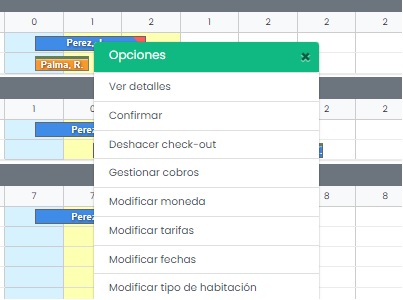
Dentro del Libro de reservas se busca la reserva, haciendo clic izquierdo sobre la misma (con el ratón o mouse), se despliega el menú de Operaciones de reservas y en este se encuentra la opción **Check-out**.
Al ejecutar el check-out se despliega un menú indicando si desea descargar el comprobante del **estado de cuenta** de la reserva.
El check-out se podrá realizar siempre que se haya registrado el check-in, de lo contrario ni se mostrará la opción en el menú.
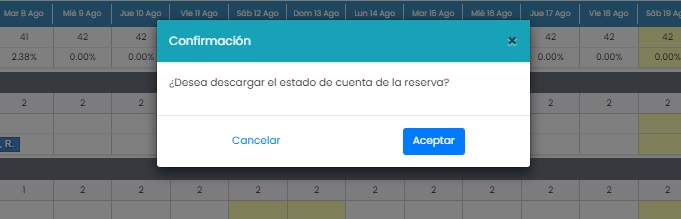
El check-out se puede deshacer. Una vez realizado el check-out, en el menù se presenta la opción deshacer check-out.
#### Alternativa: check-out por habitación
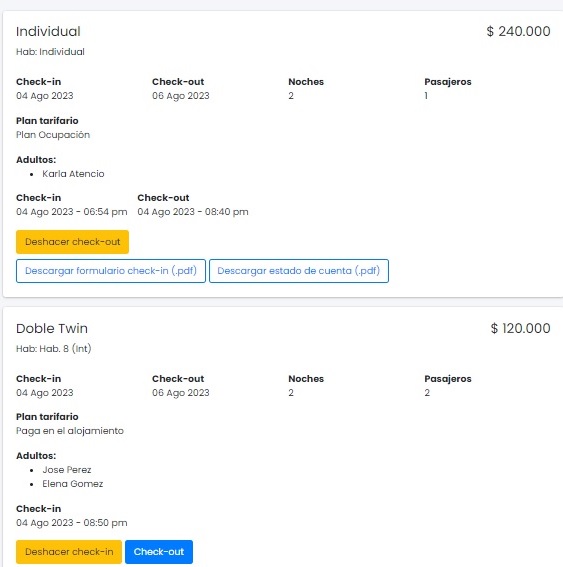
Existe otra manera para realizar el check-out, y es desde la opción [Ver detalles](https://biblioteca.paxer.com/es/como-se-visualiza-el-detalle-de-una-reserva-1?hsLang=es). Una vez ubicados en la página del detalle de la reserva, puede observar que entre los detalles del tipo de habitación, se dispone del botón check-out, siempre que se haya realizado el registro del check-in.
Se permite entonces hacer el check-out de manera independiente por cada habitación en una reserva múltiple al ejecutarlo desde la consulta Ver detalles.
- [Default HubSpot Blog](https://paxer.hubspotpagebuilder.com/blog)
[](https://paxer.com)
Centro de conocimientos
Copyright © 2026, PAXER WW